Showing posts with label Wicked Princess. Show all posts

Monday, February 18, 2013

FTU - Lucky Babe


Lucky Babe


This tutorial was written by me on February 18, 2013, using my own ideas. Any resemblance to others is coincidental and accidental. This tutorial assumes you have a working knowledge of psp and is written in PSPX.
Please leave some love when downloading supplies. The artists/creators work hard to make/share their work with us, so let's be appreciative. Please use all correct copyright information and follow all TOU’s. Let’s give credit where credit is due.
As always, tutorials are only a guideline. If you don't have the exact supplies, use ones you have or ones you choose.


Supplies:

“St. Patrick Babe” tube by Arthur Crowe
“Paddy O’Malley” FTU scrap kit by Wicked Princess
Template 21 by Yvette
Brush or mask of choice
Eye Candy 5_Impact_Glass
Eye Candy 4000_Gradient Glow
Font_HaloHandletter

Abbreviations:
EC = Eye Candy
GG = Gradient Glow
DS = Drop Shadow
C/P = Copy and Paste
FF = Flood Fill
ANL = Add New Layer
AS = Animation Shop


Open template_Shift+D_Close original
Rotate Left_Delete creator info layer
Canvas_600x600
ANL to bottom_Apply brush of choice (or FF and apply a mask)
Large Circle_Select_ANL_C/P paper 11 into selection_Select none
Small Circle__Select_ANL_FF #8cdf84_Select none
Small Rectangles_ Select_C/P paper 3 as new layer_resize until the horseshoes are in the boxes_Promote selection to layer_ANL_Expand 5_FF #008000_Contract 3_Delete_Select none
EC 5_Impact_Glass_Clear Default
Dotted Circel_Noise_100_Sharpen
C/P the following elements, re-sizing, mirroring, duplicating, placing as shown:
Bead Doodle
Doodle
Dust – Duplicate 3 times_merge together_Noise_50_Sharpen
Double Clover
Fragipini
Mug
Pipe
Pot With Rainbow
Word Art_EC 4000_GG_3_25_100_Default color
C/P tube
DS tube_0_0_50_45_Black
DS all other layers_0_0_50_10_Black
Using your Ellipse tool, foreground any contrasting color, background closed, Stroke 2_Draw out a circle the size of the Large Circle_Move it down a couple layers
Highlight to the TOP layer_grab text tool_ HaloHandletter_100_Black_Hover by circle until the A has half bar under it_Click and type out your text_Convert to raster
Close off the vector circle
Apply the EC 4000_GG to the name_DS same as all others
Crop and save!!


Wednesday, October 3, 2012

FTU - Pink Nights


Pink Nights


This tutorial was written by me on October 03, 2012, using my own ideas. Any resemblance to others is coincidental and accidental. This tutorial assumes you have a working knowledge of psp and is written in PSPX.
Please leave some love when downloading supplies. The artists/creators work hard to make/share their work with us, so let's be appreciative. Please use all correct copyright information and follow all TOU’s. Let’s give credit where credit is due.
As always, tutorials are only a guideline. If you don't have the exact supplies, use ones you have or ones you choose.


Supplies:

“Catalina” tube by Leonardo Preda available at indie-Zine
“Paint the Town Pink” FTU BCA Awareness scrap kit by Wicked Princess Scraps
Eye Candy 4000_Gradient Glow
Font_Before the Rain


Abbreviations:
EC = Eye Candy
GG = Gradient Glow
DS = Drop Shadow
C/P = Copy and Paste
FF = Flood Fill


Open blank 600x600 canvas
Add a layer – select all
C/P paper 15 into selection_select none
Apply mask
C/P the following elements, duplicating, mirroring, placing as shown:
Bauganivilla
Bca ribbon 3
Butterfly string
Calla Lily
Chaise Lounge
Champaign
Cityscape
Cityscape 2
Double heart bow
Fan
Flower petals
Glass
Glitter
Heart wreathe
Lamp
Lei flower
Lip gloss
Pansy
Perfume
Perfume 2
Rose vine
Sachet bag
Shoe blinged
Silver heart box
Silver heart charm bracelet
C/P tube
Add all correct copyright/license information
Add name_Before the Rain_72_stroke 1 #b8255b_fill Black
EC 4000_GG_3_25_100_White
DS all layers_0_0_100_10_Black
Save!!!


Tuesday, August 7, 2012

FTU - Tony's Awareness


Tony’s Awareness


This tutorial was written by me on August 07, 2012, using my own ideas. Any resemblance to others is coincidental and accidental. This tutorial assumes you have a working knowledge of psp and is written in PSPX.
Please leave some love when downloading supplies. The artists/creators work hard to make/share their work with us, so let's be appreciative. Please use all correct copyright information and follow all TOU’s. Let’s give credit where credit is due.
As always, tutorials are only a guideline. If you don't have the exact supplies, use ones you have or ones you choose.


Supplies:

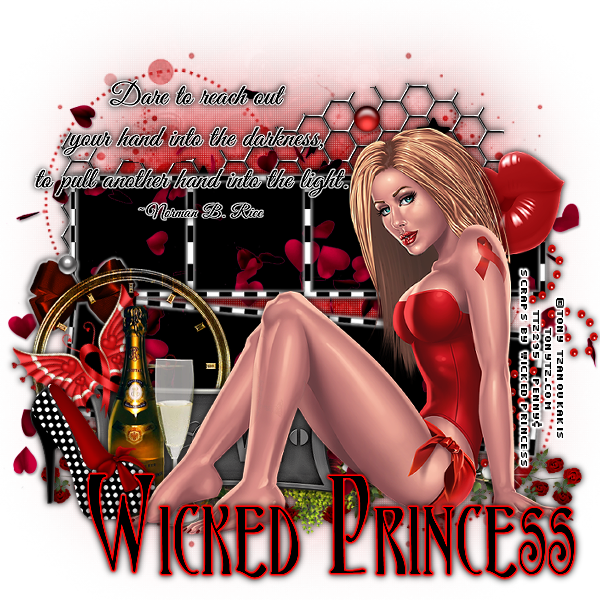
“HIV Awareness” FTU tube by Tony Tzanoukakis
“You Are Beautiful” FTU HIV Awareness scrap kit by Wicked Princess Scraps
Babes Designz Mask16 - Unfortunately Babes Designz has removed her blog. So please choose a mask you like
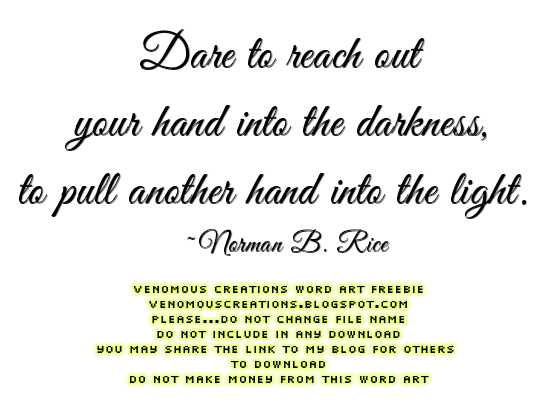
“Dare” word art - click image below, then save the full size png
Eye Candy 4000 – Gradient Glow
Font of choice – this one is Ambrosia


Abbreviations:
EC = Eye Candy
GG = Gradient Glow
DS = Drop Shadow
C/P = Copy and Paste
FF = Flood Fill


Open blank 600x600 canvas
Add new layer – select all
C/P paper 6 into selection
Select none
C/P the following elements, re-sizing, rotating, sharpening, placing as desired:
Butterfly
Champaigne
Clock
Doodle
Flower Swag
Frame – select inside – expand by 4 – add new layer below – FF Black – select none
    Still on Frame_EC 4000_GG_3_25_100_White
Glass
Hearts in the wind – place this layer between frame and black FF layer
Lips
Love Plaque
Polka Dot Shoe
Wire
C/P word art – Repeat GG
C/P tube
Add all correct copyright/license information
Add name_Ambrosia_120_Black
Repeat GG changing color to red
Sharpen more
DS all layers_0_0_100_10_Black
Save and enjoy!


Tuesday, July 17, 2012

FTU - Every Breath


Every Breath


This tutorial was written by me on July 17, 2012, using my own ideas. Any resemblance to others is coincidental and accidental. This tutorial assumes you have a working knowledge of psp and is written in PSPX.
Please leave some love when downloading supplies. The artists/creators work hard to make/share their work with us, so let's be appreciative. Please use all correct copyright information and follow all TOU’s. Let’s give credit where credit is due.
As always, tutorials are only a guideline. If you don't have the exact supplies, use ones you have or ones you choose.


Supplies:

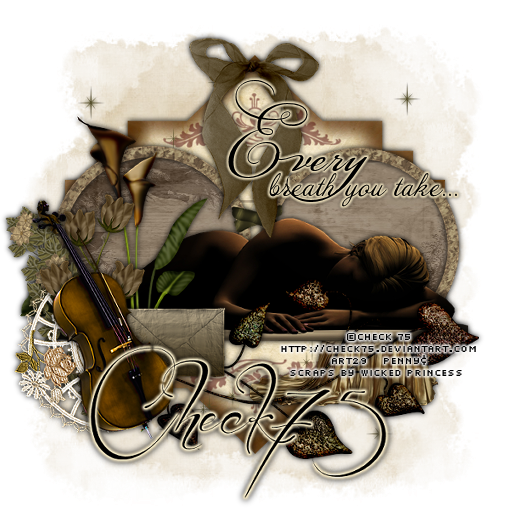
“Laying Down” tube by Check 75 available at Artistic Reality Talent
“Every Breath” FTU Lung Cancer Awareness scrap kit by Wicked Princess
Shani has some awesome awareness kits here, so please check them out and leave her some love
Becky_Mask022
Eye Candy 4000 – Gradient Glow
“Every Breath” word art
“Before the Rain” font


 click image then save as

Abbreviations:
EC = Eye Candy
GG = Gradient Glow
DS = Drop Shadow
C/P = Copy and Paste
FF = Flood Fill


Open blank 600x600 image
Add new layer
Select all
C/P paper 8 into selection
Select none
Apply mask
C/P journal note
C/P double circle frame
Select inside frames
Expand by 3
Add new layer below frame
C/P paper 9 into selection
Select none
C/P tube
C/P the following elements, re-sizing, rotating, sharpening as needed and place as shown:
Bauganvilla
Bow
Calla Lily
Cello
Drapery
Envelope
Flower Ivy
Heart Iron
Lace
Star Trail
C/P word art
EC 4000 – GG_3_25_100_ #efe1bd
DS everything_0_0_100_10_Black
Add all correct copyright/license information
Add name_Before the Rain_72_Black
Repeat GG and DS
Save as png